1. Services #
Programs that run without a session.
Control a service #
A service is a program started by the service control manager, under an account (LocalSystem, NetworkService, LocalService, a domain account or a group managed service account gMSA). Its startup type is Automatic, Automatic (delayed start), Manual or Disabled.
Get-Service | Where-Object { $_.StartType -eq 'Automatic' -and $_.Status -ne 'Running' }   # services auto arrêtés : suspects
Restart-Service Spooler -Force ; Get-Service Spooler -DependentServices
Set-Service -Name W3SVC -StartupType Automatic
Get-CimInstance Win32_Service -Filter "Name='W3SVC'" | Select-Object Name, StartName, PathName, ProcessId
sc.exe failure MonAppli reset= 86400 actions= restart/60000/restart/60000/none/0    # redémarrage automatique après échec
sc.exe qfailure MonAppli
Good practice: Run applications under a gMSA rather than a regular domain account: its long password is rotated automatically by AD and nobody knows it.
Task Scheduler #
$action  = New-ScheduledTaskAction -Execute 'pwsh.exe' -Argument '-NoProfile -File C:\Scripts\Nettoyer-Logs.ps1 -Dossier D:\Logs'
$trigger = New-ScheduledTaskTrigger -Daily -At 02:30
$princ   = New-ScheduledTaskPrincipal -UserId 'SYSTEM' -LogonType ServiceAccount -RunLevel Highest
Register-ScheduledTask -TaskName 'Nettoyage logs' -TaskPath '\Exploitation\' -Action $action -Trigger $trigger -Principal $princ
Start-ScheduledTask -TaskName 'Nettoyage logs' -TaskPath '\Exploitation\'
Get-ScheduledTask -TaskPath '\Exploitation\' | Get-ScheduledTaskInfo | Select-Object TaskName, LastRunTime, LastTaskResult, NextRunTime
Good to know: LastTaskResult is 0 on success; any other value is the script’s exit code or a scheduler error (0x41301 = running, 0x1 = program failure).2. Event logs #
The system’s memory.
Reading logs with Get-WinEvent #
The main logs are System, Application and Security, plus hundreds of “Applications and Services” logs (Microsoft-Windows-…/Operational). Get-WinEvent with -FilterHashtable filters at the source: much faster than Where-Object.
Get-WinEvent -FilterHashtable @{ LogName = 'System'; Level = 1, 2; StartTime = (Get-Date).AddDays(-1) } |
    Select-Object TimeCreated, Id, ProviderName, Message -First 20
Get-WinEvent -FilterHashtable @{ LogName = 'Security'; Id = 4625; StartTime = (Get-Date).AddHours(-1) } |
    ForEach-Object { $_.Properties[5].Value } | Group-Object | Sort-Object Count -Descending   # comptes visés par des échecs d'ouverture
Get-WinEvent -ListLog * | Where-Object RecordCount -gt 0 | Sort-Object RecordCount -Descending | Select-Object -First 10
wevtutil epl System C:\rapports\system.evtx # exporter un journal pour analyse| ID | Log | Meaning |
|---|---|---|
| 4624 / 4625 | Security | successful / failed logon |
| 4740 | Security (DC) | account locked out |
| 4720 / 4728 | Security (DC) | account created / added to a global security group |
| 7034 / 7036 | System | service terminated unexpectedly / state change |
| 41 / 6008 | System | reboot without clean shutdown (power loss, crash) |
| 1074 | System | shutdown or restart requested (by whom and why) |
| 1000 | Application | application crash (faulting module) |
Good practice: Increase the Security and System log sizes (by GPO), enable advanced audit policy and centralize logs: Windows Event Forwarding (WEF), Azure Monitor or a SIEM. A local log is wiped by an attacker or overwritten in a few hours.
3. Performance #
Measure before concluding.
Counters and method #
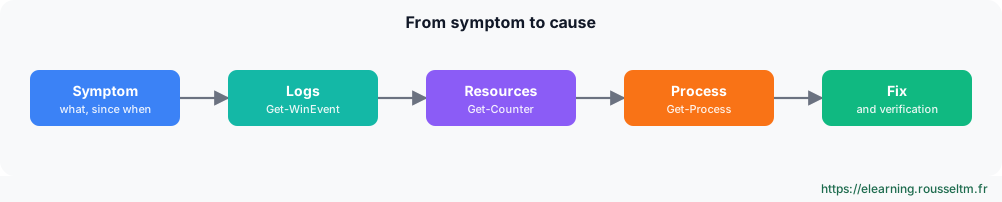
Get-Counter '\Processor(_Total)\% Processor Time', '\Memory\Available MBytes', '\LogicalDisk(_Total)\Avg. Disk sec/Transfer', '\Network Interface(*)\Bytes Total/sec' -SampleInterval 2 -MaxSamples 5
Get-Process | Sort-Object WorkingSet64 -Descending | Select-Object -First 5 Name, Id, @{n='Mo'; e={[int]($_.WorkingSet64/1MB)}}, CPU
logman create counter Perf-Base -c '\Processor(_Total)\% Processor Time' '\Memory\Available MBytes' -si 00:00:15 -o C:\PerfLogs\base
logman start Perf-Base # collecte continue, à analyser dans perfmon| Resource | Counter | Indicative alert threshold |
|---|---|---|
| CPU | % Processor Time | > 85% sustained |
| Memory | Available MBytes | < 10% of RAM |
| Disk | Avg. Disk sec/Transfer | > 20 ms (HDD), > 5 ms (SSD) |
| Network | Bytes Total/sec | > 70% of adapter bandwidth |
Graphical tools: Task Manager, Resource Monitor (resmon) to see which process uses which file or port, Performance Monitor (perfmon) for data collection, and Reliability Monitor (perfmon /rel) for the history of crashes and installations.
Commands to know #
| Action | Command |
|---|---|
| Stopped automatic services | Get-Service | Where-Object { $_.StartType -eq 'Automatic' -and $_.Status -ne 'Running' } |
| Restart a service | Restart-Service W3SVC |
| Failure recovery | sc.exe failure MonAppli reset= 86400 actions= restart/60000 |
| Create a scheduled task | Register-ScheduledTask -TaskName Sauvegarde -Action $a -Trigger $t |
| System errors of the last 24 h | Get-WinEvent -FilterHashtable @{LogName='System'; Level=2; StartTime=(Get-Date).AddDays(-1)} |
| Failed logons | Get-WinEvent -FilterHashtable @{LogName='Security'; Id=4625} -MaxEvents 20 |
| Performance counters | Get-Counter '\Processor(_Total)\% Processor Time' -Continuous |
| Reliability Monitor | perfmon /rel |
My progress
Sign in to track your progress and take notes. Sign in
💬 Questions about this lesson
No questions yet: be the first to ask for help or share your configuration.
Recommended Articles
Packages, systemd services, logs and scheduled tasks
Install and update software with apt and dnf, manage services with systemctl, write a systemd uni...
Active Directory Domain Services and DNS
Understand and deploy Active Directory: forest, domains, organizational units, domain controllers...
PowerShell for Windows administrators
Master PowerShell to administer Windows: cmdlets and help, object pipeline, filters and formats, ...
Windows administration best practices
The production checklist for Windows and Windows Server: installation, identity and Active Direct...
Windows and Windows Server: versions, editions and architecture
Discover the Windows ecosystem for administrators: Windows 11 and Windows Server 2025, editions a...
Windows storage: disks, volumes, Storage Spaces and RAID
Manage storage on Windows: GPT and MBR, partitions and volumes with PowerShell, NTFS and ReFS, St...
Windows networking: IP, DNS, DHCP, firewall and remote access
Configure and troubleshoot Windows networking with PowerShell, deploy a DHCP server, master Windo...
Windows updates and security: WSUS, Defender, BitLocker, LAPS and hardening
Maintain and secure a Windows estate: update strategy (Windows Update, WSUS, Azure Update Manager...
Backup, Hyper-V and Windows troubleshooting
Back up and restore with Windows Server Backup (including system state and Active Directory), vir...