1. Back up and restore #
The only real protection against data loss.
Windows Server Backup #
Install-WindowsFeature Windows-Server-Backup
wbadmin start backup -backupTarget:E: -include:C:,D: -allCritical -vssFull -quiet     # sauvegarde complète restaurable « bare metal »
wbadmin start systemstatebackup -backupTarget:E: -quiet                                # état du système (AD sur un DC)
wbadmin get versions -backupTarget:E:
wbadmin start recovery -version:11/14/2026-02:00 -itemType:File -items:D:\Data\Compta -recoveryTarget:D:\Restau -recursive
# Planification quotidienne
wbadmin enable backup -addtarget:E: -include:C:,D: -allCritical -schedule:02:00 -quiet
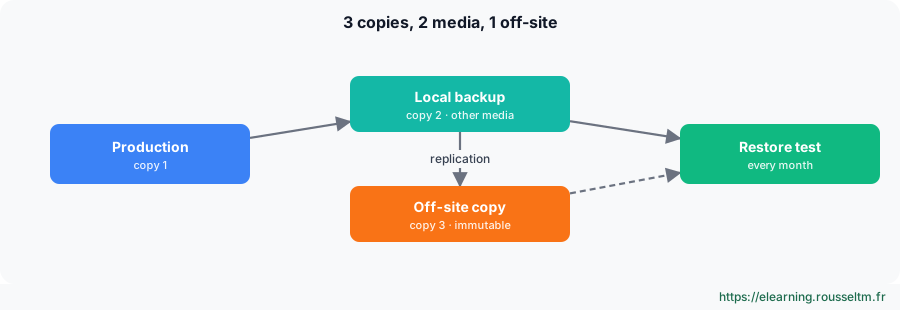
Good to know: To restore a deleted AD object, use the AD Recycle Bin first. A domain controller system state restore is done in Directory Services Restore Mode (DSRM), non-authoritatively or authoritatively (ntdsutil).Common mistake: Never testing restores. A backup that has never been restored is only a hypothesis: schedule a monthly test (a file, a whole server every quarter) and keep at least one offline or immutable copy, out of reach of ransomware that would also encrypt the backup server.
2. Hyper-V #
The hypervisor built into Windows.
Virtual machines and networks #
Install-WindowsFeature Hyper-V -IncludeManagementTools -Restart
New-VMSwitch -Name 'Externe' -NetAdapterName 'LAN' -AllowManagementOS $true      # commutateur relié au réseau physique
New-VMSwitch -Name 'Lab' -SwitchType Internal                                     # réseau isolé hôte + VM
New-VM -Name SRV-LAB01 -Generation 2 -MemoryStartupBytes 4GB -NewVHDPath D:\VM\SRV-LAB01.vhdx -NewVHDSizeBytes 80GB -SwitchName Lab
Set-VMProcessor SRV-LAB01 -Count 2 ; Set-VMMemory SRV-LAB01 -DynamicMemoryEnabled $true -MaximumBytes 8GB
Add-VMDvdDrive SRV-LAB01 -Path D:\ISO\WindowsServer2025.iso ; Set-VMFirmware SRV-LAB01 -FirstBootDevice (Get-VMDvdDrive SRV-LAB01)
Start-VM SRV-LAB01 ; Get-VM | Format-Table Name, State, CPUUsage, MemoryAssigned, Uptime| Switch | Access |
|---|---|
| External | VMs on the physical network |
| Internal | VMs and host, no physical network |
| Private | VMs among themselves only |
Checkpoints, export and replica #
Set-VM SRV-LAB01 -CheckpointType Production          # point de contrôle cohérent (VSS dans la VM)
Checkpoint-VM SRV-LAB01 -SnapshotName 'Avant mise à jour'
Get-VMSnapshot SRV-LAB01 ; Restore-VMSnapshot -VMName SRV-LAB01 -Name 'Avant mise à jour' -Confirm:$false
Remove-VMSnapshot -VMName SRV-LAB01 -Name 'Avant mise à jour'    # fusionne le fichier AVHDX
Export-VM SRV-LAB01 -Path E:\Exports
Enable-VMReplication SRV-APP01 -ReplicaServerName HV-SECOURS -ReplicaServerPort 80 -AuthenticationType Kerberos
Common mistake: Keeping checkpoints for weeks: AVHDX files grow, degrade performance and do not replace a backup. A checkpoint is kept for the duration of a change, then removed.
3. Troubleshooting Windows #
When the system is not well.
Repair the system #
sfc /scannow                                          # vérifie et répare les fichiers système protégés
DISM /Online /Cleanup-Image /ScanHealth
DISM /Online /Cleanup-Image /RestoreHealth            # répare le magasin de composants (puis relancer sfc)
chkdsk D: /scan                                       # analyse en ligne ; /f /r au prochain redémarrage pour C:
Get-WinEvent -FilterHashtable @{ LogName = 'System'; ProviderName = 'Microsoft-Windows-WindowsUpdateClient'; Level = 2 } -MaxEvents 10
shutdown /r /o /t 0 # redémarrer dans l'environnement de récupération (WinRE)| Symptom | First action |
|---|---|
| No longer boots after an update | WinRE: uninstall the latest update, or boot in safe mode |
| Blue screen | stop code + faulting module in C:\Windows\Minidump (WinDbg, !analyze -v); often a driver |
| Recently slow | Reliability Monitor, counters, hungry process, full disk |
| Service will not start | System log (7000, 7009, 7034), service account, dependencies |
| Domain logon failure | DNS, time (Kerberos: 5 min max skew), secure channel: Test-ComputerSecureChannel -Repair |
Good practice: Keep an operations log: each incident, its cause and resolution. In most cases, the decisive question is “what changed?”: update, driver, GPO, expired certificate, full disk.
Commands to know #
| Action | Command |
|---|---|
| Full backup | wbadmin start backup -backupTarget:E: -allCritical -quiet |
| Available versions | wbadmin get versions |
| Create a VM | New-VM -Name VM1 -Generation 2 -MemoryStartupBytes 4GB -NewVHDPath D:\VM\VM1.vhdx -NewVHDSizeBytes 60GB |
| Checkpoint | Checkpoint-VM VM1 -SnapshotName 'Avant changement' |
| Repair system files | sfc /scannow |
| Repair the image | DISM /Online /Cleanup-Image /RestoreHealth |
| Repair the secure channel | Test-ComputerSecureChannel -Repair -Credential CORP\admin |
| Restart into WinRE | shutdown /r /o /t 0 |
My progress
Sign in to track your progress and take notes. Sign in
💬 Questions about this lesson
No questions yet: be the first to ask for help or share your configuration.
Recommended Articles
Windows administration best practices
The production checklist for Windows and Windows Server: installation, identity and Active Direct...
Windows updates and security: WSUS, Defender, BitLocker, LAPS and hardening
Maintain and secure a Windows estate: update strategy (Windows Update, WSUS, Azure Update Manager...
Backup, monitoring and troubleshooting of a Linux server
Operate a Linux server day to day: 3-2-1 backup strategy with rsync, tar, LVM snapshots and resti...
PowerShell for Windows administrators
Master PowerShell to administer Windows: cmdlets and help, object pipeline, filters and formats, ...
Windows and Windows Server: versions, editions and architecture
Discover the Windows ecosystem for administrators: Windows 11 and Windows Server 2025, editions a...
Windows storage: disks, volumes, Storage Spaces and RAID
Manage storage on Windows: GPT and MBR, partitions and volumes with PowerShell, NTFS and ReFS, St...
Windows networking: IP, DNS, DHCP, firewall and remote access
Configure and troubleshoot Windows networking with PowerShell, deploy a DHCP server, master Windo...
Users, groups, NTFS permissions and SMB shares
Manage local accounts and groups, understand UAC, apply NTFS permissions with inheritance, create...
Active Directory Domain Services and DNS
Understand and deploy Active Directory: forest, domains, organizational units, domain controllers...