1. Updates #
Patch fast, without breaking.
Strategy and tools #
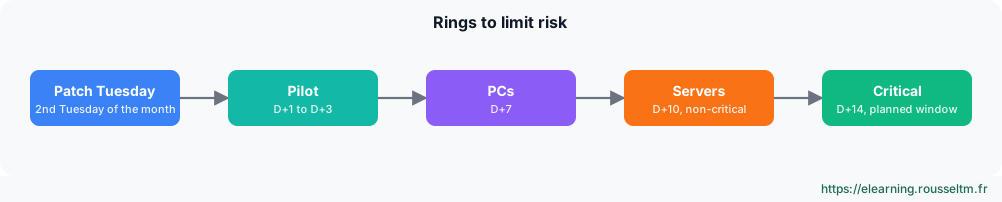
Microsoft releases security fixes on the second Tuesday of each month (Patch Tuesday), as cumulative updates. A good strategy deploys in rings: a pilot group first, then the rest, with planned reboot windows.
| Tool | For what | Note |
|---|---|---|
| Windows Update for Business | PCs managed by GPO or Intune | rings and deferrals, no local server |
| WSUS | on-premises servers and PCs | still supported but deprecated: no new features |
| Azure Update Manager | on-premises (via Azure Arc) and Azure servers | centralized assessment and scheduling |
| Hotpatch | Windows Server 2025 | fixes without reboot most months (subscription via Azure Arc) |
Get-HotFix | Sort-Object InstalledOn -Descending | Select-Object -First 5      # derniers correctifs
Install-Module PSWindowsUpdate -Scope AllUsers
Get-WindowsUpdate                                       # correctifs disponibles
Install-WindowsUpdate -AcceptAll -AutoReboot:$false
Get-WURebootStatus ; Get-WUHistory -Last 10
Common mistake: Leaving servers “too critical to reboot” unpatched for months. They are exactly the favorite targets. Plan redundancy (cluster, two DCs, load balancer) so each node can be restarted in turn.
2. Protecting PCs and servers #
Antivirus, encryption, local passwords.
Microsoft Defender Antivirus #
Get-MpComputerStatus | Select-Object AMServiceEnabled, RealTimeProtectionEnabled, AntivirusSignatureLastUpdated, QuickScanAge
Update-MpSignature ; Start-MpScan -ScanType QuickScan
Get-MpThreatDetection | Select-Object -First 5
Add-MpPreference -ExclusionPath 'D:\SQLData'            # exclusion documentée et limitée (recommandations de l'éditeur)
Set-MpPreference -AttackSurfaceReductionRules_Ids 'd4f940ab-401b-4efc-aadc-ad5f3c50688a' -AttackSurfaceReductionRules_Actions Enabled   # règle ASR : bloquer les processus enfants d'Office
Good to know: Defender is built in and sufficient as an antivirus; Microsoft Defender for Endpoint (paid) adds detection and response (EDR), essential to investigate an intrusion.
BitLocker #
Enable-BitLocker -MountPoint 'C:' -EncryptionMethod XtsAes256 -TpmProtector -UsedSpaceOnly
Add-BitLockerKeyProtector -MountPoint 'C:' -RecoveryPasswordProtector
$kp = (Get-BitLockerVolume -MountPoint C:).KeyProtector | Where-Object KeyProtectorType -eq 'RecoveryPassword'
Backup-BitLockerKeyProtector -MountPoint 'C:' -KeyProtectorId $kp.KeyProtectorId   # sauvegarde de la clé dans AD
manage-bde -status
Common mistake: Enabling BitLocker without backing up the recovery key in AD or Entra ID: one firmware update or motherboard change, and the data is lost. Enforce key backup by GPO before encryption.
Windows LAPS #
Windows LAPS, built into Windows since 2023, gives each machine a unique local administrator password, rotated automatically and stored in AD (or Entra ID), readable only by authorized people.
Update-LapsADSchema                                                # une fois par forêt
Set-LapsADComputerSelfPermission -Identity 'OU=Serveurs,DC=corp,DC=exemple,DC=fr'
# GPO : Système > LAPS > Configurer la sauvegarde du mot de passe = Active Directory
Get-LapsADPassword -Identity SRV-FS01 -AsPlainText
Reset-LapsPassword                                                 # sur la machine, après usage du compte
3. Hardening #
Reducing the attack surface.
Key measures #
| Measure | How |
|---|---|
| Microsoft baselines | Security Compliance Toolkit: ready-to-import GPOs, compared with Policy Analyzer |
| SMB | SMBv1 absent, signing required, encryption on sensitive shares |
| Credentials | Credential Guard, LSA protection, “Protected Users” group for admins |
| NTLM | audit then restrict, prefer Kerberos |
| Administration | tier model, privileged access workstations (PAW), separate accounts, MFA |
| Applications | AppLocker or App Control for Business (WDAC), Server Core, minimal roles |
Get-WindowsOptionalFeature -Online -FeatureName SMB1Protocol      # doit être Disabled
Get-SmbServerConfiguration | Select-Object EnableSMB1Protocol, RequireSecuritySignature, EncryptData
Get-CimInstance -Namespace root\Microsoft\Windows\DeviceGuard -ClassName Win32_DeviceGuard | Select-Object SecurityServicesRunning
auditpol /get /category:*                                         # stratégie d'audit effective
Good practice: Measure your level with a free tool such as PingCastle (Active Directory) or HardeningKitty (servers), fix red items first, and measure again every quarter.
Commands to know #
| Action | Command |
|---|---|
| Latest updates | Get-HotFix | Sort-Object InstalledOn -Descending |
| Install updates | Install-WindowsUpdate -AcceptAll |
| Defender status | Get-MpComputerStatus |
| Quick scan | Start-MpScan -ScanType QuickScan |
| Encrypt the system disk | Enable-BitLocker -MountPoint C: -TpmProtector |
| BitLocker status | manage-bde -status |
| LAPS password | Get-LapsADPassword -Identity SRV01 -AsPlainText |
| Disable SMBv1 | Disable-WindowsOptionalFeature -Online -FeatureName SMB1Protocol |
My progress
Sign in to track your progress and take notes. Sign in
💬 Questions about this lesson
No questions yet: be the first to ask for help or share your configuration.
Recommended Articles
Windows administration best practices
The production checklist for Windows and Windows Server: installation, identity and Active Direct...
PowerShell for Windows administrators
Master PowerShell to administer Windows: cmdlets and help, object pipeline, filters and formats, ...
Windows and Windows Server: versions, editions and architecture
Discover the Windows ecosystem for administrators: Windows 11 and Windows Server 2025, editions a...
Group Policy (GPO): configuring the estate from Active Directory
Design and troubleshoot Group Policy: computer and user configuration, OU linking, LSDOU order, i...
Windows storage: disks, volumes, Storage Spaces and RAID
Manage storage on Windows: GPT and MBR, partitions and volumes with PowerShell, NTFS and ReFS, St...
Windows networking: IP, DNS, DHCP, firewall and remote access
Configure and troubleshoot Windows networking with PowerShell, deploy a DHCP server, master Windo...
Backup, Hyper-V and Windows troubleshooting
Back up and restore with Windows Server Backup (including system state and Active Directory), vir...
Linux server security and hardening
Harden a Linux server: least privilege, updates, secure SSH, firewall, fail2ban, SELinux and AppA...
Users, groups, NTFS permissions and SMB shares
Manage local accounts and groups, understand UAC, apply NTFS permissions with inheritance, create...