1. Disks and volumes #
Preparing a disk.
Initialize, partition, format #
A new disk is initialized as GPT (recommended, required beyond 2 TB and for UEFI) or MBR (legacy). Partitions are created, formatted with a file system and mounted on a letter or folder.
Get-Disk | Format-Table Number, FriendlyName, Size, PartitionStyle, OperationalStatus
Initialize-Disk -Number 1 -PartitionStyle GPT
New-Partition -DiskNumber 1 -UseMaximumSize -DriveLetter D |
    Format-Volume -FileSystem NTFS -NewFileSystemLabel Data -AllocationUnitSize 4096 -Confirm:$false
Get-Volume ; Get-PSDrive -PSProvider FileSystem
Resize-Partition -DriveLetter D -Size (Get-PartitionSupportedSize -DriveLetter D).SizeMax   # étendre après agrandissement du disque
diskpart
DISKPART> list disk
DISKPART> select disk 1
DISKPART> clean # efface la table de partitions : vérifiez le numéro !
DISKPART> convert gpt
DISKPART> create partition primary
DISKPART> format fs=ntfs quick label=Data
DISKPART> assign letter=DCommon mistake: RunningcleanorClear-Diskon the wrong disk. Check the number withGet-Disk(size, model, serial number) right before; a system or data disk is not recoverable afterwards.
NTFS or ReFS? #
| Criterion | NTFS | ReFS |
|---|---|---|
| Use | system, files, general purpose | Hyper-V, Storage Spaces Direct, backups, large volumes |
| Windows boot | yes | no |
| Integrity | journaling, chkdsk | checksums, automatic repair with mirror |
| Features | quotas, compression, EFS, deduplication | block cloning (fast VHDX), deduplication |
2. Redundancy: Storage Spaces and RAID #
Protecting data against a disk failure.
Storage Spaces #
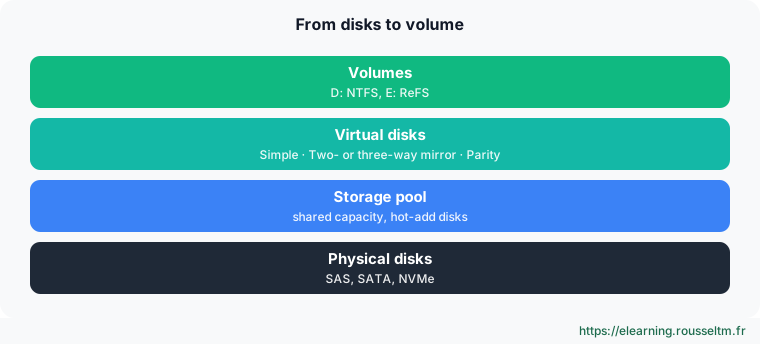
Storage Spaces is Windows’ modern software RAID. Disks form a pool; virtual disks are created in it with a chosen resiliency. The old “dynamic disks” (mirror, RAID 5 in Disk Management) are deprecated in favor of Storage Spaces.
| Resiliency | RAID equivalent | Min. disks | Usable capacity | Failures tolerated |
|---|---|---|---|---|
| Simple | RAID 0 | 1 | 100 % | 0 |
| Two-way mirror | RAID 1 / 10 | 2 | 50 % | 1 |
| Three-way mirror | 3-copy RAID 1 | 5 | 33 % | 2 |
| Parity | RAID 5 | 3 | ≈ (N−1)/N | 1 |
| Dual parity | RAID 6 | 7 | ≈ (N−2)/N | 2 |
Get-PhysicalDisk -CanPool $true
New-StoragePool -FriendlyName Pool1 -StorageSubSystemFriendlyName 'Windows Storage*' -PhysicalDisks (Get-PhysicalDisk -CanPool $true)
New-VirtualDisk -StoragePoolFriendlyName Pool1 -FriendlyName Miroir -ResiliencySettingName Mirror -NumberOfDataCopies 2 -UseMaximumSize -ProvisioningType Fixed
Get-VirtualDisk Miroir | Get-Disk | Initialize-Disk -PartitionStyle GPT -PassThru |
    New-Partition -UseMaximumSize -DriveLetter E | Format-Volume -FileSystem ReFS -NewFileSystemLabel Miroir
Get-StoragePool Pool1 | Get-PhysicalDisk | Select-Object FriendlyName, HealthStatus, Usage
Repair-VirtualDisk -FriendlyName Miroir             # après remplacement d'un disque
Good to know: Parity has heavy write penalties: keep it for archives and backups, and use mirror for virtual machines and databases. RAID level principles are detailed in the Linux course. Storage Spaces Direct (Datacenter edition) extends this model to several clustered servers (hyperconvergence).
Hardware RAID #
A hardware RAID controller presents Windows a single, already redundant disk; it is managed with the vendor’s tool (iDRAC, iLO, MegaRAID). Do not combine hardware RAID and Storage Spaces on the same disks: Storage Spaces wants disks presented as is (HBA or JBOD mode).
3. Protecting and optimizing data #
Snapshots, quotas, deduplication.
Shadow copies, quotas and deduplication #
# Clichés instantanés (VSS) : versions précédentes des fichiers d'un partage
vssadmin add shadowstorage /for=D: /on=D: /maxsize=10%
vssadmin create shadow /for=D:          # sur un serveur ; planifiez-les deux fois par jour
vssadmin list shadows

# Quotas et filtrage de fichiers (rôle FSRM)
Install-WindowsFeature FS-Resource-Manager -IncludeManagementTools
New-FsrmQuota -Path D:\Data\Users -Size 20GB -Description 'Dossiers personnels'

# Déduplication des données (fichiers, VDI, sauvegardes)
Install-WindowsFeature FS-Data-Deduplication
Enable-DedupVolume -Volume D: -UsageType Default ; Get-DedupStatus
Common mistake: Treating shadow copies or RAID as a backup. They are on the same server, often on the same volume: ransomware, a controller failure or a fire takes them away. See backup, Hyper-V and troubleshooting.
Commands to know #
| Action | Command |
|---|---|
| List disks | Get-Disk |
| Initialize as GPT | Initialize-Disk -Number 1 -PartitionStyle GPT |
| Create and format a volume | New-Partition -DiskNumber 1 -UseMaximumSize -AssignDriveLetter | Format-Volume -FileSystem NTFS |
| Extend a volume | Resize-Partition -DriveLetter D -Size 200GB |
| Create a pool | New-StoragePool -FriendlyName Pool1 -StorageSubSystemFriendlyName 'Windows Storage*' -PhysicalDisks (Get-PhysicalDisk -CanPool $true) |
| Virtual disk health | Get-VirtualDisk | Select-Object FriendlyName, ResiliencySettingName, HealthStatus |
| Check a volume | Repair-Volume -DriveLetter D -Scan |
| Free space | Get-Volume | Select-Object DriveLetter, SizeRemaining, Size |
My progress
Sign in to track your progress and take notes. Sign in
💬 Questions about this lesson
No questions yet: be the first to ask for help or share your configuration.
Recommended Articles
Users, groups, NTFS permissions and SMB shares
Manage local accounts and groups, understand UAC, apply NTFS permissions with inheritance, create...
Storage on Linux: disks, partitions, file systems and LVM
Administer Linux storage: lsblk and blkid, GPT partitioning, ext4 and XFS, mounting and /etc/fsta...
Windows administration best practices
The production checklist for Windows and Windows Server: installation, identity and Active Direct...
PowerShell for Windows administrators
Master PowerShell to administer Windows: cmdlets and help, object pipeline, filters and formats, ...
Windows and Windows Server: versions, editions and architecture
Discover the Windows ecosystem for administrators: Windows 11 and Windows Server 2025, editions a...
Windows networking: IP, DNS, DHCP, firewall and remote access
Configure and troubleshoot Windows networking with PowerShell, deploy a DHCP server, master Windo...
Windows updates and security: WSUS, Defender, BitLocker, LAPS and hardening
Maintain and secure a Windows estate: update strategy (Windows Update, WSUS, Azure Update Manager...
Backup, Hyper-V and Windows troubleshooting
Back up and restore with Windows Server Backup (including system state and Active Directory), vir...
Active Directory Domain Services and DNS
Understand and deploy Active Directory: forest, domains, organizational units, domain controllers...